




Showing posts with label technology. Show all posts
Showing posts with label technology. Show all posts
Tuesday, September 3, 2013

Sadly, it’s the last day of our Back-to-School Blowout, but that doesn’t mean you still can’t win a ton of cool back-to-school gear for your little (and not so little) ones, make sure you check out our sidebar for all of the latest MIBR giveaways!
If you’ve been around here for a while then you know that I’m an iPhone user and have been for the last couple of years, but prior to me finding (and falling in love with) the iPhone 4, I was a hardcore Blackberry user who never thought they’d make the switch, but I did and have so far not looked back—until the Blackberry Z10.
I thought that Blackberry would be the perfect smartphone to showcase for our back-to-school series, because they are traditionally the better phone (at least in my opinion) when it comes to work related uses. So Blackberry sent me the Blackberry Z10 to play around with and share my thoughts with all of you—this could get interesting! When I first shared on Facebook that I would be reviewing the Z10 I stated that it would have to preform BIG to make me fall out of love with my iPhone and while I wouldn’t say that I’ve been completely convinced about making the switch, there is a whole lot to love about this phone.

Blackberry Z10 Specifications
- 16 GB Internal Storage
- 4.2” Touch screen display
- 8 MP Rear Camera
- 4G LTE Ready
- 1280x768 resolution, 356 ppi
- Qualcomm® Snapdragon™ S4 processor
- 1080p HD video recording
- Up to 13 days* standby time
- BlackBerry® 10 operating system
- MicroSD memory card
- Up to 10 hours* talk time (3G)
Since I find it so much easier to break reviews down into small sections, I thought I would do this review based on what I love about the Z10 and what I dislike about the Z10, but first check out some of my very favorite things about the Z10 in the video below!

What I LOVE about the Blackberry Z10
The Screen
When I first received the Z10 I was instantly impressed with the size of the touch screen, as an iPhone 4 user, I find myself envying other smartphone users who have big, bold screens and the Z10 definitely beats the iPhone 4 in that respect. My previous Blackberry smartphones have been combination touch screen and Qwerty keyboard and while I did love the ease of being able to use either/or, I definitely like the full touch screen of the Z10 much better than I thought I would. One of the hardest things for me was going from a Blackberry Torch that was had a touchscreen and Qwerty keyboard to an all touchscreen phone with the iPhone, so I was convinced that I wouldn’t like the all touchscreen Blackberry offering, but it turns out that I really do prefer the Z10’s touchscreen to my own iPhone 4.
The Blackberry Hub
I’m nothing if not impatient and unorganized (though I swear I try not to be either) so I’m convinced that the Blackberry Hub was invented for people like me. I like to refer to the Hub as the epicenter of the Z10 because it contains almost everything you need to access in one place and it’s always there. All of your emails, texts, Facebook posts, Tweets—everything, is right there in the Hub and it’s accessible with just a quick finger swipe to the right. I don’t know about you, but for someone as impatient as I am, moving from one app to another or closing an app out to get to a text or waiting for an app to load is just torture and the Blackberry Hub makes waiting a thing of the past because it’s all there…all the time. I love the Hub, it’s one of my absolute favorite features of the Blackberry Z10!
It’s SUPER FAST
Again, I adore my iPhone, but it’s SO slow sometimes. Maybe it’s all of the apps bogging it down, maybe it’s something else, all I know is that the Z10 is so much faster than other smartphones I’ve used. I love that I can quickly move from app to email to text in no time and without waiting—(see above, I hate waiting). The BB Z10 browser is also extremely nice, it’s crazy fast compared to every other smartphone browser I’ve used, web pages load in no time (even those with a tons of images and banners), the images are crisp and clear and overall I prefer it to the browser on my iPhone. A major problem I’ve always had with other smartphones is how slow and well, for lack of a better word, sucky, the browsers were, with the Z10 you can browse anytime, anywhere (with and without wifi connectivity) with ease, which is a major selling point for me considering how often I use my browser both at home and away.
The Camera
I take a LOT of pictures, every single day and since lugging around my camera isn’t always the best option for me, I depend on my smartphone to take the majority of my shots. The camera on my iPhone has always been an issue for me, while it isn’t awful, it’s nowhere near consistent, bouncing back and fourth between great shots and shots that I can’t even use, I’m always missing great shots of my kids because my phone just can’t handle the pressure—yeah, I’m pretty convinced that’s the issue. Below are just a few of the amazing shots that my 11 year old captured with the Blackberry Z10—I’m pretty sure I can’t even take pictures like that with my regular camera—amazing!


The camera on the Blackberry Z10, is without a doubt the best smartphone camera I’ve used! From capturing pictures of my kids in action, to capturing images of the smallest bug with such amazing, beautiful detail, the Z10 could give other smartphone cameras a lesson or two for sure. I love the BB Z10’s Time Shift mode that allows you to take a picture and then essentially choose which frame works best, for shots of the kids or group shots, this mode alone is invaluable. Since I thought that the Time Shift camera mode was one of the best features of the Z10, I thought I’d make a short video showing Time Shift in action.

For someone like me who is constantly taking pictures, the Time Shift mode is a huge time (and stress) saver. I love that I can edit the photo as soon as I take it, right on the phone, without having to move it from place to place.
While I do love the camera on the Blackberry Z10, I don’t love the video camera and here’s why…basically, I haven’t found a great way to hold it to take video without the sound quality of the video being compromised. The Z10 does take gorgeous video visually, but the sound quality just isn’t up to par, but that is the one and only complaint I have.
Email is the Bomb.com with the Z10
The one thing I hated about switching from a Blackberry to an iPhone was the email. Blackberry has always made business it’s number one priority and it shows in how fluid and easy it is to send emails with the Blackberry OS. I love that you can add multiple images or documents to your emails and then open and download images and documents with the Z10, the iPhone makes sending emails and opening images in emails a huge ordeal and don’t even get me started on how long it takes to open documents with the iPhone. With the Z10 it’s a breeze, if I had to chose one feature of the Blackberry OS I miss most, it would definitely be how easy sending and receiving emails can be with a Blackberry.
What I Don’t Love About the Blackberry Z10
Can We Get Some Apps Please?
The lack of popular apps was the number one reason I switched from a Blackberry to an iPhone in the first place and two years later, it’s still the Blackberry’s number one downfall (at least for me it is). While some of the most popular apps like Facebook, Twitter, LinkedIN and FourSquare are present on the Blackberry Z10 (mine came with all four already added to my phone), there are definitely some major apps missing. I found myself switching back and fourth between the Z10 and my iPhone 4 just so I could access apps I use all the time like Pinterest and Instagram and don’t even get me started on the fact that the Blackberry App world does not include Candy Crush. While the apps may be seriously lacking with Blackberry, the apps that they do offer, mainly Facebook, is in my opinion far superior to that of the iPhone. Facebook on my iPhone is constantly having issues and I have yet to experience any kind of problems with Facebook for Blackberry. Seriously though, I found myself searching the Blackberry App World for apps that I could use and often times coming up empty handed—it was actually kind of disappointing. If Blackberry could get some of the more popular apps added to the list of apps that they currently offer, I would switch from my iPhone back to a Blackberry in a second—that’s seriously the only thing keeping me from fully committing to Blackberry again.
Will I Switch?
That’s pretty much the only bad thing I have to say about the Z10 and it’s actually not even really about the Z10—the phone itself is amazing, it’s the quintessential Blackberry—strong, built to perform, classy and so much fun to use. Honestly I’ve wanted another Blackberry for a while now, it really is my favorite brand of smartphone, and the Z10 has made me want one so much more, there really isn’t anything about the phone I don’t love—now, if we could only get Blackberry to get on the Candy Crush train, I’d convert in a second.
If you’re looking for a new smartphone for yourself, or maybe you’re looking for one for your high school or college student, I think the Blackberry Z10 is the perfect choice!
Disclosure: I received the product mentioned above in order to facilitate my review...all opinions are my own!
Tuesday, February 5, 2013
While I always try to keep my house, kids and car clean as clean as possible (most of the time it’s a losing battle, but that’s another story), one area of my life where I am all kinds of messy, is my purse—seriously. My husband and brother-in-law affectionately call my purse “Rumpke”; for those of you not familiar with what Rumpke is, it’s a trash collection company here in southern Ohio, I’m pretty sure that means that it’s worse than pretty bad.

Try as I might, my purse is always full of, well…everything. You see, it’s not that I don’t like for my purse to be clean and organized, on the contrary actually, I am much happier when it’s tidy than when it looks like half the contents of my house are crammed inside, it’s just that it seems SO hard to do, and don’t even get me started on how I lose everything inside it, especially my cell phone. Speaking of cell phones, I’ve mentioned numerous times how much I adore my iPhone 4, so you can understand how constantly searching through my mess of a purse to find mine, is a little annoying. Given my purse situation, I try to keep my phone in my hands all the time, but as you can imagine, that too gets real old, real fast. Imagine my surprise when I found a company who solved both of my issues with one great product—BellaVita.
BellaVita was born out of two business school students’ love of stylish and functional accessories. When friends Kati Issaians and Julia Leytes saw the need for stylish smart phone accessories to match the constantly evolving devices, they decided to do something about it and that’s when BellaVita was created.
Bell Vita’s products are meticulously crafted to be stylish and functional, made of fine leather, BellaVita is an accessory whose sophistication and understated elegance are not compromised for the sake of functionality. BellaVita’s wristlets and wallets are inspired by life and all its beauty; chocolate, roses, blue waves on a white beach, and summertime are just a few of those inspirations. Bella Vita wristlets are available in several gorgous colors for iPhone 4 /4s and iPhone 5 and Bella Vita Wallets are available for iPhone 4/4s, all for less than $70. Aside from being super functional and very stylish, BellaVita’s creations are guaranteed for life and that’s why they are, in my opinion, one of the best iPhone accessories I’ve owned.
I recently received the Vita Bacca iPhone 4 leather wristlet from BellaVita to review and though a wristlet was way outside my comfort zone (my youngest child is 4 yet my purse still rivals most diaper bags in size), I decided to give it a shot at becoming my new accessory of choice.

About the Vita Bacca iPhone 4/4s wristlet…
BellaVita vita bacca collection offers luxurious buttery soft leather, a beautiful hot berry color, and smart design that complement a variety of styles and activities. BellaVita supports the iPhone functionality in style: call, text, take photos, or simply carry your iPhone in an elegant yet protective case.
Features:
- Genuine soft leather in signature “vita bacca” hue
- Elegant and practical design
- Compliments a variety of styles and activities
- Allows for full iPhone 4 functionality
- Comes with a life-time warranty
Upon receiving the Vita Bacca I was instantly impressed with the quality of the wristlet, most wristlets I’ve seen that were even mildly attractive, had been poorly made, making my decision not to own one, that much stronger. The Vita Bacca is not only very well made, it’s also extremely fashionable, as a matter of fact, I was super excited to trade my heavy, messy purse in while I gave the wristlet a trial run and I definitely didn’t see myself being that excited to give up an accessory I’d been toting around (in one form or another anyway) for 30 years. One of the things that I love most about my iPhone 4 is the number of cases that are available for them, of course, none of those cases also double as a mini-wallet, but the Vita Bacca does—major score! In addition to being a super stylish and cute iPhone case (that still allows you to take pictures, make calls, use headphones and charge all while the phone is in the Bella Vita case), the Vita Bacca can also also be used as a wallet, it allows plenty of room for your ID, important credit cards, and even a pocket to keep a little cash on hand—another major selling point for me.
As with most of the products I review, I like to not only use it in public (to gauge the products appeal on a mass audience), I also like to ask family and friends for their thoughts and I’m happy to report that nearly everyone who has seen the Vita Bacca wristlet, has commented on how “stylish” and “convenient” it it and I have to agree. Though I never saw myself as a wristlet kind of girl, old habits die hard and I honestly believed I’d be a purse girl forever, I can’t find too many reasons not to give up old Rumpke for the Vita Bacca. As a matter or fact, I’ve used my wristlet from Bella Vita for a few weeks now and aside from being slightly annoying when I’m making a phone call (I found the wristlet to be a little awkward to manipulate when I’m using my phone) I can’t find any real good reason to switch back to my purse—color me shocked! And at the risk of being captain obvious, BellaVita would make a great Valentine’s Day gift idea for the woman (or man) in your life you can even enjoy 15% off your entire purchase plus FREE shipping every day through February 18, 2013.
Want to try your hand at winning a BellaVita iPhone 4,4S Wristlet or Wallet of your choice? Then check out the Bella Vita website to find out more and to enter the BellaVita giveaway.
You can also check out BellaVita on Facebook and Follow @BellaVitaUSA on Twitter for the latest product news and updates!
Disclosure: I received the products mentioned above in order to facilitate my review…all opinions are my own!
Tuesday, November 10, 2009
**Updated with winner at the bottom of the post**
Thanks to all who entered!
Anyone who sits at a computer most of the day typing can tell you how much havoc it wreaks on their hands, mine are always sore and cold from countless hours spent typing.
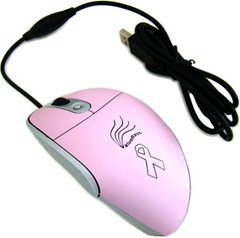
When I was given the chance to do a review for ValueRays Pink Warm Mouse III, I was very excited. Since I can remember I’ve had cold hands, it’s one of the things that bother me most and with my carpal tunnel it makes using the computer for long periods rather difficult. The ValueRays Pink Warm Mouse III is a heated, ergonomic, multifunction mouse that is designed help prevent the onset of Repetitive Strain Injury (RSI) and Cumulative Trauma Disorder (CTD). It’s ergonomic design coupled with the messaging infrared heat make the ValueRays Pink Wame Mouse III different from similar designs. Here is a little more about the ValueRays Pink Warm Mouse III from the website:
The Pink Computer Mouse by ValueRays® is a heated computer mouse and great gift idea communicating an important message, "Find a Cure for Cancer!" There are over 200 different types of cancers, not including the many varieties of skin cancer. Over 1/2 million Americans died from cancer in 2008. The pink mouse is our way of supporting the fight against cancer. The pink computer mouse by ValueRays® is a healthy source of infrared heat. The pink mouse can be used with or without heat. The pink computer mouse design is large and ergonomic with a long cord and comfortable shape. If you or someone you know suffers with cold hands when using the computer consider the purchase of the Pink Computer Mouse by ValueRays® and support the fight against cancer!
One of the first things I noticed about the ValueRays Pink Warm Mouse III was how much bigger it is than my normal mouse, that is due to the Pink Warm Mouse’s large ergonomic design. I have to admit that it did take some getting used to before I could use the Pink Warm Mouse comfortably. My hands are pretty small, definitely smaller than the average woman’s hands, so I never have become completely comfortable using the mouse, for me it is a bit awkward and hard to maneuver. I did however, love the warmth that radiated from the mouse, not only did it keep my hands warm it made using the mouse seem easier for me. I also love the fact that this company is dedicated to helping, a portion of the proceeds from every sale of the ValueRays Pink Warm Mouse III is donated to the American Cancer Society, which is awesome!
Buy it! You can purchase the ValueRays Pink Warm Mouse III online at http://www.warm-mouse-heated-keyboard.com/. This item will make a great holiday gift!
Check out Misadventures in Baby Raising’s Holiday Gift Guide to see this and lots of other great gift ideas!
Now for the best part. One misadventures in Baby Raising reader is going to win a ValueRays Pink Warm Mouse III!
Win it! To be entered in this giveaway please visit the ValueRays product page and have a look around, come back and leave a comment on this post and tell me which item(s) you like most (other than the Pink Warm Mouse III). This is mandatory and must be completed to be eligible for extra entries!
Extra Entries!
- Follow Misadventures in Baby Raising via my RSS feed, Email, or on Blogger…2 extra entries each!
- Follow me on Twitter and Tweet this giveaway…1 Tweet Per Day = 1 Extra Entry per day!
- Grab one of my buttons (please change the code in my main button if you already have the old button)…2 extra entries each!
- Become a Fan of Misadventures in Baby Raising on Facebook (and post about this giveaway)…4 extra entries!
- Subscribe to ValueRays email newsletter and receive a Discount coupon…2 extra entries!
- Follow ValueRays on Twitter…2 extra entries!
- Become a Fan of ValueRays on Facebook…2 extra entries!
- Comment on any non-giveaway post…1 extra entry per comment!
- Enter any other giveaway on MIBR…1 extra entry per additional extry!
- Blog about this giveaway with links to this post and ValueRays…5 extra entries!
This giveaway ends on Tuesday November 24, 2009 at 11:59 PM EDT. One winner will be chosen via Random.org and announced in this post! Winner will have 48 hours to contact me and claim their prize; failure to do so will result in winner forfeiting the prize and me choosing another winner.
US Entrants Only Please

GOOD LUCK!
Winning number:
Random Integer Generator
Here are your random numbers:
65
Timestamp: 2009-11-25 22:29:17 UTC
Winning commenter:
ValueRays® Mouse Hand Warmer
Thanks for the giveaway >^..^<
bloggyig at gmail dot com
Subscribe to:
Posts
(
Atom
)

Popular Posts
-
Being a stay-at-home-mom is so not glamorous! Most days my wardrobe consists of sweats and T-shirts, which is just fine with me beca...
-
**Updated with winner at the bottom of this post** Thanks to all who entered! If you’re a parent you know how important it is to have a pape...
-
I’ve mentioned many times how important it is for me that my children enjoy reading. Thankfully all of my children do love to read and be r...


